วันจันทร์ที่ 15 มกราคม พ.ศ. 2561
The Use of Multimedia in English Teaching
The Use of Multimedia in English Teaching
What is Multimedia?
The Definition of Multimedia
Multimedia: the use of computers to present text, graphics, video, animation, and sound in an integrated way.
Components of Multimedia
Text. It is fundamental element in all multimedia applications. It conveys most information (Vanghan, 2004)
Graphics. It refers to images and pictures, such as chart, diagram, and photograph, which contain no movement.
Animation. Animation is the rapid display of sequence of images of 2-D or 3-D artwork or model positions in order to create an illusion of movement.
Sound. It is speech, music, or any other sound that is stored and produced by computers. It has more advantages than tape recorder.
Video. It is the visible part of a television transmission and broadcasts visual images of stationary or moving objects.
The Setting of Multimedia Classroom
An illustration of a typical one-multimedia-PC classroom setting is vital and necessary.
1. MPC-multimedia personal computer
2. VCD/DVD player-video compound disk/digital video disk;
3. Amplifier and Hi-Fi acoustic system
4. Overhead/slide projector
5. Screen/curtain
6. Projecting apparatus
7. The internet access
8. Cassette tape recorder
9. Camera recorder
The Necessity of Multimedia in English Teaching
The Necessity of Development of Modern Educational Technology
The development of modern educational technology not only promotes the development of educational methods and means, but also promotes the development of educational thinking and model.
The Needs of Quality Education
Multimedia English language teaching can enable students to be involved in a variety of sensory organ in the learning process and stimulate the students in the corresponding cortical function area.
The Needs of Students’ Cognitive Mental
Under the present circumstances, only the multimedia teaching system can fully mobilize the students’ audio-visual and other sensory organs, and thus get the best of the cognitive effect.
The Multimedia Teaching
Advantages
Arousing the students’ interest. Multi-media teaching can not only greatly stimulate students’ interest in learning, but also make teaching becomes vivid and lively.
Improving students’ self-learning ability. The most important thing is teaching students how to learn and making students change from “want me to study” to “I want to learn” in thinking, from passive learning to active learning.
Improving students’ innovative ability. In teaching, the teachers should pay attention to tap the imagination of students. To use multimedia can achieve the desired results and find unlimited resources in textbooks.
Cultivating students’ communication skills. Through multi-media teaching, we can create real-life scenes in the classroom. It is not only to shorten the distance between teaching and practice and give students the opportunity to use English to communicate, but also to satisfy their curiosity in psychology and stimulate the expression of desire.
Increasing classroom capacity. Multi-media teaching rhythm is adapted to the needs of modernization to meet the student’s desire for knowledge. It can expand text-related materials. The use of multimedia technologies can make students notice a clear knowledge and a new expansion by huge information capacity which shows by all kinds of media.
Problems: Teaching English with multi-media has many problems.
Confusion. Some English classes are totally dependent on multi-media, ignoring the role of teachers.
Performance on behalf of the lead. The teaching process is that teachers arouse students’ enthusiasm and guide students to active learning. Multimedia just only provides a supporting role in the process.
Lack of special skills. The unskilled operation on computer would affect the instruction flow, which in turn would de-motive students if it happened frequently in class.
Over-use of multimedia. Because of the teacher’s lack of enthusiasm and creation and his or her dependence on the multimedia technology, the teachers act as sole information-giver to the students.
Lack of interaction between teachers and students. The teachers in the multimedia classroom are busy with machine operation—computer, DVD player, overhead projector, courseware—which might even get the proficient teachers busy, let alone those unskilled.
Strategies for Using Multimedia
Combining Modern Teaching Methods with Traditional Teaching Methods
Teachers should combine their Traditional Teaching Methods with modern teaching methods, which not only raise classroom teaching quality and efficiency, but also improve teaching and learning environment between teachers and students.
Viewing Multimedia as the Assistance to Teaching
When we use computers in the teaching, we should understand they can only assist but cannot take place of all the other teaching methods.
Building the Ideal Relationship between Teachers and Students
It is wrong for some people to hold the view that machine can take place of human beings. It is more challenging role for teachers now that the expectations are more complex.
Strengthening Teacher Training
Teachers should be expert in one thing and good at many. They should know well about modern educational theories and techniques.
The Principles of Multimedia-Assisted Teaching
1. Scientific principles. Namely, courseware design cannot appear any errors;
2. Subsidiary principle. We must always adhere to: Although multi-media teaching has many advantages, it is only a supplementary means, and does not substitute for the role of people;
3. Interactivity principle. More interactivity between teachers and students, students and multimedia, more effective results we will have;
4. Combination principle. Combine the advantages of modern teaching and the traditional teaching organically.
Computer assisted language learning
Computer assisted language learning
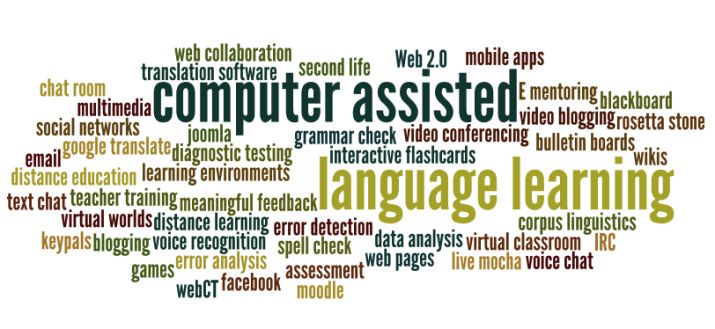
Computer-Assisted Language Learning (CALL) is defined as “the search for and study of applications of the computer in language teaching and learning.” (Levy,1997: 1)
Aim to find ways for using computers for the purpose of teaching and learning the language.
Definition of CALL
CALL is represented by the use of computer technologies that promote educational learning, including
– word processing, presentation packages, guided drill and practice, tutor, simulation, problem solving, games, multimedia CD-ROM, and
– internet applications such as e-mail, chat and the World Wide Web (WWW) for language learning purposes
Terms associated with CALL
• Computer-Aided Language Learning (CALL)
• Computer-Assisted Language Instruction (CALI)
• Computer-Enhanced Language Learning (CELL)
• CALL and CALI refer to computer applications in language learning and teaching
• CELL implies using CALL in a self-access environment (Hoven, 1999).
The reasons why ELT teachers use CALL:
• Computers can do some of the work of the teacher and provide great assistance to the learner even without the presence of the teacher (Pennington and Steven, 1992).
• New technologies have seen computers become smaller, faster, and easier for the teacher to use (Evy, 1997).
• well-designed CALL software is readily available to the teacher
• Technologies allow computers to do multimedia applications, incorporating video, sound, and text, and this capacity allows the learner to interact with both the program and other learners. (Felix, 1998)
• The computer offers great flexibility for class scheduling and pacing of individual learning, choosing activities and content to suit individual learning styles. (Oxford and others, 1998)
• The computer can provide a meaning-focused, communicative learning environment, which serves the purposes of communicative language teaching.
HISTORY OF CALL DEVELOPMENT
Warschauer (1996) divides CALL into phases of development as follows:
• Behavioristic CALL
• Communicative CALL,
• Integrative CALL (Multimedia CDROM)
• Integrative CALL (internet)
USES OF CALL IN ENGLISH LANGUAGE TEACHING
Drill and practice :
• a tool for saving time with the immediate feedback The learning principles behind Drill and Practice is the Behaviorism Learning Theory and the Audiolingual approach language to teaching.
• aim of Drill and Practice is to review the content / background knowledge, and to assist the learners to master separate language skills (such as reading, listening, etc.)
Drill and practice consists of three steps:
• Providing stimulus;
• Receiving active response from the learner; and
• Giving immediate feedback
There are several types of drill and practice activities (exercises):
• Paired Associate (Matching);
• Sentence Completion;
• Multiple Choice;
• Part Identification;
• True-False; and
• Short-Answer questions
Computer as tutor
• The role of the computer as tutor is to present to the learners the content of the lesson as text graphics, video, animation, or slides, including learning activities, drills and practice.
• The computer serves as a means for delivering instructional materials.
• The program consists of the following stages:
• Introduction stage (stating aims, background knowledge),
• Presentation of the content, exercises and/or testing;
• Giving the feedback
• Examples of CALL tutorial programs are:
•Grammar: Longman Grammar Software; Grammar Expert Plus; Tense Buster (Clarity Software); Grammar
Mastery (ALA); Grammar Rom (Addison Wesley Longman); Grammar 3D: Contextualized Practice for Learners
of English (Heinle & Heinle).
•Reading: Read It! Study Skills (Clarity Language Consultants) (EAP reading); RocketReader (1998) (a speed reading program); ReadFlex (Speed Reading); Reading for English (Athelstan) (Reading Comprehension); SEEN: Tutorials for Critical Reading (KenCD Software) (tutorials designed to develop analytical thinking and critical reading skills); Accelerated Reader (Advantage Learning Systems).
•Writing: Paragraph Punch (a writing tutor for effective paragraph); WriteExpress Easy Letters (effective business letters); Power Editing (an interactive tutorial on how to edit and revise sentences); Report Writer for Science and Engineering Reports (Clarity Language Consultants) (EFL/ESL report science and engineer writing).
•Speaking, Pronunciation & Listening: Learn to Speak (The Learning Company); English Pronunciation (1997-98) (Okanagan University College); Dragon, Naturally Speaking (A voice recognition program); See It, Hear It, Say It! (Courseware Publishing International); Accent Improvement (SpeakWare); Real English (Wiser Software).
•Integrated Skills / Courseware: Ellis (CALI), Dynamic English (DynEd); English Discoveries (Berlitz); English Language Development (Jostens); Rosetta Stone (Fairfield Language Technologies); Planet English (Unisearch Ltd and the University of New South Wales); Issues in English (Protea Software); Active English (Courseware Publishing International).
Computer used for simulation / problem solving
• Simulations and problem solving is used to foster analysis, critical thinking, discussion and writing activities.
• The program is designed to create language interaction through problematic situations, conditions or problems challenging for the learner to solve. Many simulation programs are problem solving games, which are entertaining and educational ("edutainment").
• The main principle behind computer gaming is that
“Learning is Fun.”
• aim is to create a pleasurable learning environment , motivate the language learner, provide entertainment to the learner
• CALL games and simulation games are similar in that both are designed to motivate students to learn through entertainment
– Simulation games always use simulations (real life situations) in the presentation of a game, while CALL games focus on
– providing fun, but challenging environment to the learner.
• Word Processors: creating documents, handouts, exercises
• Spelling checkers
• Grammar checkers
• Concordancers
• Collaborative writing
• Reference software: encyclopedias, dictionaries, thesauruses, maps
• Authoring: Authorware (Macromedia), Adobe Captivate
Internet applications:
• To access text, graphics, audio, video, and animation published on the internet, the teacher and learner need to use "Web browser" software, a computer based graphical program that allows users to search and explore information on the internet.
• The following are internet applications that ELT teachers can use for language teaching:
– Electronic mail (e-mail)
– World Wide Web (WWW): Texts, Pictures, Audio files,
Video files, Chat & voice chat, Desk-top teleconferencing
วันอาทิตย์ที่ 14 มกราคม พ.ศ. 2561
Exercise: acronyms
ACRONYMS
ICT : stands for the abbreviation for “information and communications technology” (the study and use of computers, internet, video, and other technology as a subject at school.)
CAI : computer-assisted instruction or computer-aided instruction
CALL : computer assisted language learning
WBI : Web based instruction
CBI : Computer Based Instruction
CMC : Computer Mediated Communication
TELL : Teaching English Language Learners
MUD : Multiple User Dialogue
MOO : MUD Object Oriented
Synchronous Tools
What is synchronous learning?
Examples of synchronous e-learning are online chat and videoconferencing. Any learning tool that is in real-time, such as instant messaging that allows students and teachers to ask and answer questions immediately, is synchronous. Rather than learning on their own, students who participate in synchronous learning courses are able to interact with other students and their teachers during the lesson.
The main benefit of synchronous learning is that it enables students to avoid feelings of isolation since they are in communication with others throughout the learning process. However synchronous learning is not as flexible in terms of time as students would have to set aside a specific time slot in order to attend a live teaching session or online course in real-time. So it may not be ideal for those who already have busy schedules.
Asynchronous Tools
Asynchronous learning on the other hand can be carried out even when the student or teacher is offline. Coursework and communications delivered via web, email and messages posted on community forums are perfect examples of asynchronous e-learning. In these instances, students will typically complete the lessons on their own and merely use the internet as a support tool rather than venturing online solely for interactive classes.
A student is able to follow the curriculum at their own pace without having to worry about scheduling conflicts. This may be a perfect option for users who enjoy taking their time with each lesson plan in the curriculum and would prefer to research topics on their own. However, those who lack the motivation to do the coursework on their own may find that they do not receive significant benefit from asynchronous learning. Asynchronous learning can also lead to feelings of isolation, as there is no real interactive educational environment.
Ideally, effective e-learning courses should include both asynchronous and synchronous learning activities. This allows students and teachers to benefit from the different delivery formats regardless of their schedules or preferred learning methods. This approach provides students with access to immediate help if needed, while still giving them the ability to learn at their own pace.
Reference : https://www.talentlms.com/elearning/synchronous-vs-asynchronous-elearning

counter

Popular Posts
-
 🔸🔷 Hello! :) 🔷🔸 ↞↞↞↞↞↞ ☸ ↠↠↠↠↠↠ My name is Kanokwan Kongkapun. You can call me "OIL". My student I...
 -
 Using Corpus Analysis Software to Analyse Specialised Texts What is a corpus? In corpus linguistics...
 -
 ขั้นตอนในการออกแบบ CAI ขั้นตอนการออกแบบคอมพิวเตอร์ช่วยสอนมี 7 ขั้นตอน ดังนี้ ขั้นตอนที่ 1 : ขั้นตอนการเตรียม (Preparation) ...
Introduce my self
🔸🔷 Hello! :) 🔷🔸 ↞↞↞↞↞↞ ☸ ↠↠↠↠↠↠ My name is Kanokwan Kongkapun. You can call me "OIL". My student I...

Popular Posts
-
 🔸🔷 Hello! :) 🔷🔸 ↞↞↞↞↞↞ ☸ ↠↠↠↠↠↠ My name is Kanokwan Kongkapun. You can call me "OIL". My student I...
 -
 Using Corpus Analysis Software to Analyse Specialised Texts What is a corpus? In corpus linguistics...
 -
 ขั้นตอนในการออกแบบ CAI ขั้นตอนการออกแบบคอมพิวเตอร์ช่วยสอนมี 7 ขั้นตอน ดังนี้ ขั้นตอนที่ 1 : ขั้นตอนการเตรียม (Preparation) ...
 -
 การออกแบบหน้าจอบทเรียน เนื่องจากการจัดทำบทเรียนคอมพิวเตอร์ช่วยสอนเป็นการนำเสนอผ่านคอมพิวเตอร์ ดังนั้นการออกแบบหน้าจอจึงเป...
 -
Using Weblogs in Foreign Language Classrooms: Possibilities and Challenges Theoretical Justification of Using Web 2.0 Web-...
-
ACRONYMS IT : stands for the abbreviation for “information technology” (the study and use if electric processes and equipment to st...
-
The Use of Multimedia in English Teaching What is Multimedia? The Definition of Multimedia Multimedia: the use of c...
-
Computer assisted language learning Computer-Assisted Language Learning (CALL) is defined as “the search for and study of applications...
-
Adobe Captivate 8 การติดตั้งโปรแกรม Adobe Captivate 8 ทำหน้า Login ก่อนเข้าสู่บทเรียน Adobe Captivate 8 ...
-
Blogger Blogger Part 1 เริ่มต้น Blogger Part 2 การใส่ Template Blogger Part 3 เพิ่ม Facebook Page Plugin Blogger...


Popular Posts
-
🔸🔷 Hello! :) 🔷🔸 ↞↞↞↞↞↞ ☸ ↠↠↠↠↠↠ My name is Kanokwan Kongkapun. You can call me "OIL". My student I...
-
Using Corpus Analysis Software to Analyse Specialised Texts What is a corpus? In corpus linguistics...
-
ขั้นตอนในการออกแบบ CAI ขั้นตอนการออกแบบคอมพิวเตอร์ช่วยสอนมี 7 ขั้นตอน ดังนี้ ขั้นตอนที่ 1 : ขั้นตอนการเตรียม (Preparation) ...
-
การออกแบบหน้าจอบทเรียน เนื่องจากการจัดทำบทเรียนคอมพิวเตอร์ช่วยสอนเป็นการนำเสนอผ่านคอมพิวเตอร์ ดังนั้นการออกแบบหน้าจอจึงเป...
-
Using Weblogs in Foreign Language Classrooms: Possibilities and Challenges Theoretical Justification of Using Web 2.0 Web-...
-
ACRONYMS IT : stands for the abbreviation for “information technology” (the study and use if electric processes and equipment to st...
-
The Use of Multimedia in English Teaching What is Multimedia? The Definition of Multimedia Multimedia: the use of c...
-
Computer assisted language learning Computer-Assisted Language Learning (CALL) is defined as “the search for and study of applications...
-
Adobe Captivate 8 การติดตั้งโปรแกรม Adobe Captivate 8 ทำหน้า Login ก่อนเข้าสู่บทเรียน Adobe Captivate 8 ...
-
Blogger Blogger Part 1 เริ่มต้น Blogger Part 2 การใส่ Template Blogger Part 3 เพิ่ม Facebook Page Plugin Blogger...